Your Google Business Profile is one of the most important assets for attracting local customers. Before people visit your website, request an estimate, or call your business, they often view your profile in Google Search or Google Maps. The information they find there can significantly influence whether they choose your business or continue searching for another option.
Many business owners assume improving their Google Business Profile requires months of work or advanced SEO knowledge. While long-term optimization certainly produces the strongest results, several improvements can be made relatively quickly. Updating your profile with accurate information, adding quality photos, responding to customer reviews, and publishing helpful content can all strengthen your online presence in a short period of time.
It’s important to remember that no single change guarantees higher rankings overnight. Google’s local search algorithm considers many factors, including relevance, distance, and prominence. However, businesses that maintain complete, accurate, and active profiles are generally better positioned to earn customer trust and improve their local visibility over time.
This guide explains the fastest ways to strengthen your Google Business Profile, improve customer engagement, and create a stronger foundation for long-term local SEO success.
Key Takeaways
- A complete and accurate Google Business Profile creates a stronger first impression.
- Regular updates, reviews, and photos demonstrate that your business is active.
- Consistency across your website and online listings supports local SEO.
- Customer engagement helps build trust and improve visibility.
- Ongoing profile management delivers better long-term results than one-time updates.
Complete Every Section of Your Business Profile

One of the quickest improvements you can make is ensuring every section of your Google Business Profile is fully completed.
Many businesses claim their profile but leave important fields unfinished. Missing business hours, incomplete service descriptions, outdated phone numbers, or inaccurate categories can create confusion for customers while limiting the effectiveness of your profile.
Review every section carefully. Confirm that your business name, address, phone number, website, hours of operation, service areas, categories, and business description accurately represent your company.
Complete profiles provide customers with the information they need while helping Google better understand your business. Although completeness alone won’t guarantee higher rankings, it contributes to a stronger overall presence and improves the customer experience.
Whenever your business information changes, update your profile promptly so customers always receive accurate details.
Verify That Your Information Is Consistent Everywhere
Consistency is an important part of local SEO.
Your Google Business Profile should match the information displayed on your website and other trusted online directories. Even small differences in your business name, address, phone number, or website URL can create confusion for search engines and potential customers.
Review your website, social media profiles, online directories, and local citations to ensure they all display the same core business information. Consistent details reinforce your business’s legitimacy and make it easier for Google to connect information across the web.
If your business recently moved, changed phone numbers, or updated its branding, prioritize correcting outdated information wherever it appears.
Maintaining consistency also reduces the likelihood of verification issues and helps create a more professional online presence.
Add High-Quality Photos
Visual content significantly influences how customers perceive your business.
Profiles with professional, authentic photos often make stronger first impressions than profiles containing only a logo or a few outdated images. High-quality photos help customers understand your business before they contact you and build confidence in the services you provide.
Include exterior and interior photos if you have a physical location. Showcase your team, products, completed projects, equipment, or work environment depending on your industry.
Update your gallery regularly rather than uploading photos only once. New images demonstrate that your business remains active while giving returning visitors fresh content to explore.
Original photos are generally much more effective than generic stock images because they accurately represent your business and create a greater sense of authenticity.
Encourage More Authentic Customer Reviews
Customer reviews are among the first things potential customers notice when comparing local businesses.
Rather than waiting for reviews to appear naturally, create a consistent process for inviting satisfied customers to share honest feedback. Asking shortly after completing a successful service or purchase often produces the best results because the experience is still fresh in the customer’s mind.
Make the process simple by providing a direct review link through email or text message. Keep your request polite and emphasize that you appreciate honest feedback rather than asking specifically for positive reviews.
Avoid offering incentives or attempting to manipulate reviews, as these practices may violate Google’s policies.
Over time, a steady stream of genuine customer reviews strengthens both your online reputation and your overall local marketing efforts.
Respond to Reviews Promptly
Responding to customer reviews is one of the easiest ways to demonstrate that your business values customer feedback.
Thank customers who leave positive reviews and respond professionally to concerns raised in negative reviews. Thoughtful responses show prospective customers that your business is attentive, respectful, and committed to providing excellent service.
Engaging with reviews also encourages future customer interaction. People are often more willing to leave feedback when they see that businesses actively acknowledge customer experiences.
Responding consistently doesn’t require lengthy messages. Even brief, personalized replies can strengthen relationships while contributing to a well-managed Google Business Profile.
Publish Regular Google Business Profile Posts

One of the fastest ways to show that your business is active is by publishing regular Google Business Profile posts.
Many business owners claim their profile, complete the basic information, and never update it again. While a complete profile is important, consistent posts give potential customers fresh information and demonstrate that your business continues serving the community.
Your posts don’t have to be lengthy. You can share business updates, highlight a specific service, announce seasonal promotions, answer frequently asked questions, introduce team members, or provide helpful industry tips. Educational content is especially valuable because it positions your business as a knowledgeable resource rather than focusing only on sales.
For most businesses, posting once each week provides a practical balance between consistency and quality. Maintaining a regular schedule keeps your profile current and gives visitors additional reasons to engage with your business.
Choose the Most Accurate Business Categories
Your primary and secondary business categories help Google understand exactly what your business offers.
Selecting the wrong category—or choosing categories that are too broad—can reduce the relevance of your Business Profile for local searches. Your primary category should represent your main service, while secondary categories should accurately describe additional products or services you provide.
Avoid selecting categories simply because they seem popular or competitive. Every category should accurately reflect your business.
If your services change over time, review your categories periodically to ensure they continue representing your business correctly. Small adjustments can improve the relevance of your profile without requiring major changes.
Showcase Your Services and Products
Many Google Business Profiles allow businesses to list individual services or products directly on their profile.
This section provides customers with additional information before they visit your website. Rather than offering only a general description of your business, you can explain the specific services you provide and help customers understand whether your company meets their needs.
Service descriptions should be clear, informative, and customer-focused. Explain what each service includes and avoid using unnecessary technical language whenever possible.
Product-based businesses can also benefit from adding photos, descriptions, and pricing where appropriate. A well-developed services or products section helps customers make informed decisions while improving the completeness of your Business Profile.
Keep Your Business Hours Accurate
Incorrect business hours create frustration for customers and may result in missed opportunities.
If someone arrives at your location only to discover you’re closed, or calls outside of your actual operating hours, their experience with your business begins negatively.
Review your regular business hours throughout the year and update them whenever necessary. Remember to adjust your schedule for holidays, special events, vacations, or temporary closures.
Accurate hours demonstrate reliability and help customers plan their visits with confidence. They also reduce unnecessary phone calls from customers simply trying to confirm whether your business is open.
Answer Customer Questions Before They Ask
The Questions and Answers section of your Google Business Profile is an excellent way to provide helpful information before potential customers contact your business.
Many customers ask similar questions about appointments, pricing, parking, payment methods, service areas, warranties, or availability. Adding clear, accurate answers helps them make informed decisions while reducing the number of repetitive inquiries your staff needs to handle.
Review this section regularly to ensure the information remains accurate. Because anyone can submit questions and, in some cases, provide answers, incorrect or outdated information can appear if the section isn’t monitored.
Keeping your responses current and accurate builds trust, improves the customer experience, and ensures visitors receive reliable information directly from your business.
Monitor Your Google Business Profile Insights
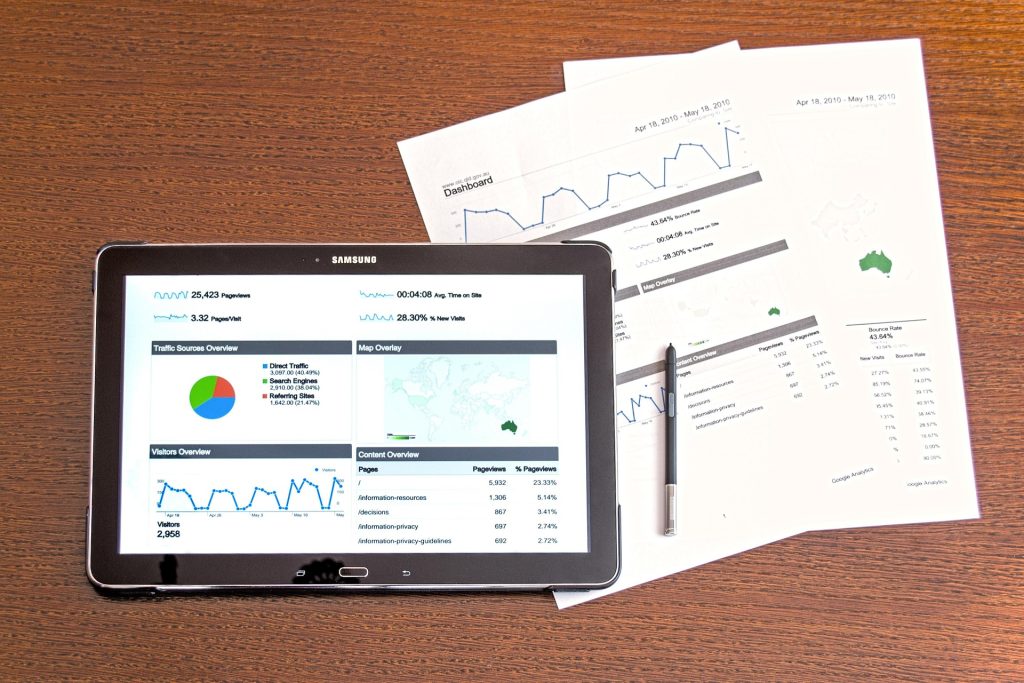
Improving your profile is easier when you understand how customers interact with it.
Google Business Profile provides performance insights that help you identify trends in customer behavior. You can review information such as profile views, website visits, phone calls, requests for directions, and customer searches that led people to your business.
These insights help you evaluate which optimization efforts are working well and where additional improvements may be needed.
For example, if profile views are increasing but phone calls remain low, you may want to improve your photos, strengthen your calls to action, or provide more detailed service information.
Regularly reviewing your profile’s performance helps you make informed decisions instead of relying on guesswork.
Avoid Common Google Business Profile Mistakes
Even small mistakes can reduce the effectiveness of your Google Business Profile and make it harder for potential customers to find and trust your business. Avoiding these common issues can help you maintain a stronger local presence.
Keep your profile up to date. Creating your profile is only the first step. Review it regularly to ensure your business hours, contact information, services, and photos are accurate. Outdated or incomplete information can frustrate customers and make your business appear inactive.
Avoid making frequent changes to core business details. Constantly updating your business name, primary category, address, or other key information can create inconsistencies and may trigger additional verification by Google. Only make these changes when your business information has genuinely changed.
Don’t use keyword stuffing. Adding extra keywords, locations, or services to your business name or description in an attempt to improve rankings violates Google’s guidelines. Always use your official business name and write clear, natural descriptions that accurately represent your business.
Respond to customer reviews. Make it a habit to reply to both positive and negative reviews in a professional manner. Thank customers for their feedback, answer concerns when appropriate, and demonstrate that you value customer experiences. Regular responses can strengthen your reputation and build trust with future customers.
Complete every section of your profile. Fill out all relevant information, including your business description, products or services, attributes, website, and photos. A complete profile provides customers with the information they need while helping Google better understand your business.
How These Improvements Strengthen Local SEO
Each optimization step contributes to a stronger overall local SEO strategy.
Accurate business information helps Google understand your business and display it appropriately in local search results. High-quality photos build customer trust, while authentic reviews reinforce your reputation. Regular posts and updated services demonstrate that your business remains active and engaged.
When these elements work together, your Google Business Profile becomes more informative and useful for potential customers. Even though no single update guarantees immediate ranking improvements, consistently maintaining your profile creates stronger signals that support long-term visibility.
Businesses that actively manage their profiles are generally better positioned to attract local customers than those that leave their listings untouched for months or years.
Focus on Consistency Instead of Quick Fixes
Many business owners search for a single change that will dramatically improve their Google Business Profile overnight. In reality, sustainable improvements come from consistently maintaining every aspect of your profile.
Rather than looking for shortcuts, develop simple habits that keep your profile current. Update photos regularly, respond to reviews, publish helpful posts, verify your business information, and review your profile’s performance on a regular basis.
Small improvements made consistently often produce greater long-term results than major changes made only once.
A well-maintained Google Business Profile reflects a well-managed business, and that’s exactly the type of experience customers—and Google—want to see.
Advanced Strategies to Maximize Your Google Business Profile
Creating a complete Google Business Profile is only the beginning. To maintain strong local search visibility, you should regularly optimize and manage your profile. Businesses that consistently appear in local search results are often those that treat their profiles as an ongoing marketing asset rather than a one-time setup.
Review Your Profile Regularly
Set aside time every few weeks to review your profile for accuracy. Verify that your business hours, contact information, website link, services, and other details remain current. Update your profile whenever your business introduces new services, changes operating hours, renovates its location, or experiences any other significant changes. Keeping your information accurate helps customers make informed decisions while maintaining Google’s confidence in your business information.
Keep Your Profile Active
An active profile signals that your business is engaged and operating. Continue uploading recent photos, responding to customer reviews, answering questions, and publishing Google Business Profile posts whenever you have relevant updates. You can share new blog articles, seasonal promotions, special offers, company announcements, community involvement, or new services to keep your profile fresh and informative.
Align Your Profile With Your Marketing
Your Google Business Profile should support your overall marketing strategy. Ensure the information, branding, and messaging on your profile match your website and other online platforms. Consistency across every customer touchpoint strengthens your brand, reinforces trust, and provides a better user experience.
Learn From Your Competitors
Review the profiles of successful businesses in your local market to better understand what customers expect. Observe the quality of their photos, the frequency of their reviews, the services they highlight, and the way they present their business. Use these insights to identify opportunities for improvement while maintaining your own unique brand identity. The goal is not to copy competitors but to continually refine your profile so it better serves potential customers.
Treat Optimization as an Ongoing Process
Google Business Profiles perform best when they receive consistent attention. Regular updates, accurate information, fresh content, and ongoing customer engagement help strengthen your local presence over time. By making profile management part of your long-term marketing routine, you can improve customer trust, increase visibility in local search, and create more opportunities for potential customers to discover and choose your business.
Why Ongoing Google Business Profile Management Matters
Many business owners focus heavily on optimizing their profile once and assume the work is complete. In reality, Google Business Profiles require ongoing attention to remain competitive.
Customer expectations change over time, businesses evolve, and Google’s features continue to expand. A profile that was considered complete a year ago may now be missing important information or opportunities to engage potential customers.
Routine management helps ensure your profile remains accurate and useful. This includes responding to reviews, publishing fresh updates, adding new photos, monitoring customer questions, reviewing profile insights, and updating business information whenever necessary.
These ongoing improvements strengthen customer confidence while supporting your broader local SEO strategy. A business that actively manages its online presence often creates a stronger first impression than one with outdated information and little recent activity.
Final Thoughts
The fastest way to improve your Google Business Profile is to focus on the fundamentals. Complete every section of your profile, keep your business information accurate, upload high-quality photos, encourage authentic customer reviews, respond to feedback, and publish helpful updates on a regular basis.
Although no single change guarantees immediate ranking improvements, these actions work together to create a stronger online presence that benefits both customers and your local SEO strategy.
Consistency is the key to long-term success. Businesses that regularly manage their Google Business Profile demonstrate professionalism, maintain customer trust, and remain competitive in local search results.
Instead of searching for quick fixes, invest in ongoing profile management that reflects the quality of your business. Over time, these consistent efforts can help you attract more qualified leads, generate more customer inquiries, and strengthen your visibility in Google Search and Google Maps.
Frequently Asked Questions
What is the fastest improvement I can make to my Google Business Profile?
For many businesses, completing every section of the profile with accurate information is the quickest and most valuable improvement. Updating your business hours, categories, contact information, services, photos, and business description provides immediate benefits for both customers and search visibility.
How long does it take to see results?
Some improvements, such as better customer engagement and increased profile activity, may become noticeable relatively quickly. However, stronger local SEO performance typically develops gradually as your profile continues earning reviews, receiving updates, and building authority over time.
Should I update my Google Business Profile every week?
Regular maintenance is recommended. Many businesses benefit from checking their profile weekly, responding to reviews as they arrive, and publishing new posts or photos on a consistent schedule.
Do customer reviews help my Google Business Profile?
Yes. Authentic customer reviews help build trust with potential customers and contribute to your overall local SEO strategy. Encouraging satisfied customers to leave honest feedback and responding professionally to reviews are both important parts of profile management.
Can I improve my Google Business Profile without a website?
Yes, you can still optimize your Google Business Profile even if you don’t have a website. However, having a professional website provides additional information for customers and supports a more comprehensive local SEO strategy.
What should I avoid when optimizing my profile?
Avoid keyword stuffing, inaccurate business information, fake reviews, unnecessary profile edits, duplicate listings, and any practices that violate Google’s Business Profile guidelines. Sustainable optimization always produces better long-term results than shortcuts.